Every Course You've Played. One Golf Passport.
LFG Golfing is a golf course tracker for people who remember the day as clearly as the score. Log a course the evening you play it, watch your passport fill in behind you, and keep the whole history — courses, rounds, states, countries — in one place on your iPhone.
Log the round, keep the course
Tracking a course takes about a minute, and it happens after the round rather than during it — there is nothing to carry around the course and nothing to remember to start on the first tee. Tap the plus button, search for the course you played, set the date, and add a score if you feel like recording one. Scores are optional on purpose: plenty of rounds are worth keeping and best left un-totalled.
From the same screen you can tag the friends who were out there with you and drop in the photos from the day. Tag a friend and the round shows up in their logbook too once they confirm it, so a foursome ends up with one shared memory of the day instead of four slightly different ones. Hit Tag it and you're done.
Your golf passport fills itself in
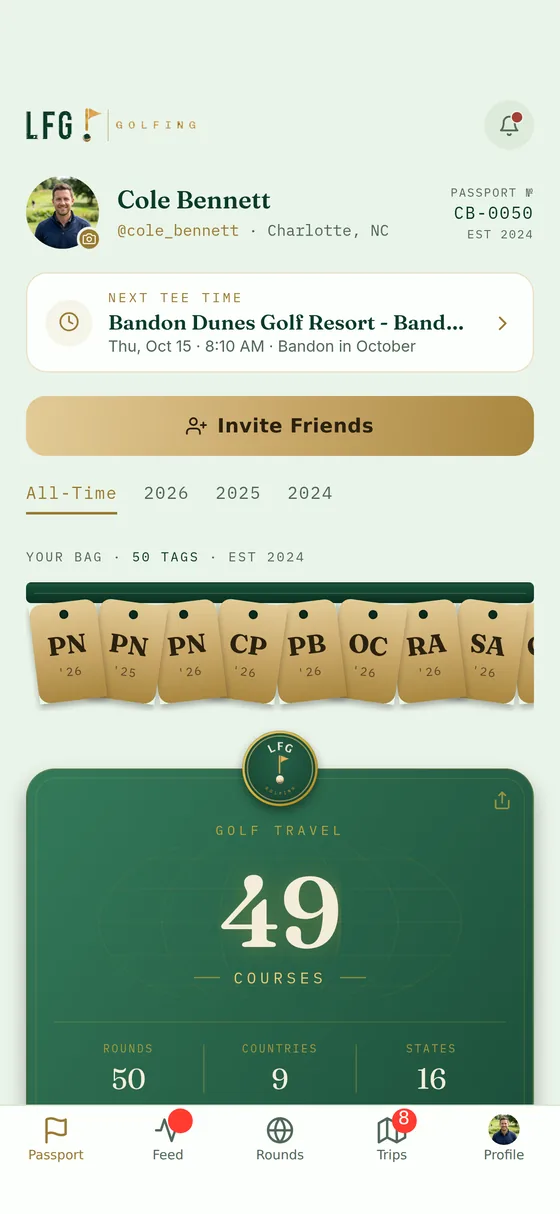
Every round you log feeds the same place: your passport. It counts the courses you've played, the rounds behind them, the states and countries you've played in, and your low round with the course it came at. There is no spreadsheet to keep up and no end-of-year tidying — you track golf courses played simply by logging the rounds as you go.
The map is the part people show their buddies. Courses with a location drop onto a globe you can spin, so a decade of golf reads as a shape rather than a list, and a trip to a new state or a new country is visible the moment you log it. Tap into a place and you get the rounds behind it: the courses, the dates and who you played with.
The passport on this page belongs to Cole Bennett, the demo profile in our App Store screenshots. Yours starts at zero and fills in from the first round you log.
A golf bucket list you might actually finish
A golf passport app is only half the story if it can't tell you what's still ahead of you. Lists are the other half. Follow one of the ranked lists in the app — Golf Digest World's 100 Greatest Courses, for instance — and the courses you've already logged tick themselves off, so the list always knows where you are.
Your own golf bucket list works the same way. Build a custom list of the courses you want to get to, put them in the order you care about, and let your logged rounds mark them off as you play them. Cole's ranked-list progress below is what that looks like a few years in.
Share the history with the golfers who were there
Golf is a group sport with a solo scorecard, and the app leans on the group half. Friends are mutual — you send a request and the other golfer accepts — and once you're connected their rounds appear in your feed as they log them. Tagging turns a round you logged into a round you both have.
When a round or a milestone is worth showing off, the app builds a share card for it: your course history and your stats rendered as an image you can drop straight into the group chat. What everyone else sees is up to you — your profile can be public, friends-only or private, and you can change that at any time in Settings.
Played somewhere the app hasn't heard of?
Add it. If a course doesn't turn up in the search — a nine-hole muni, a private club, a course on the other side of the world — you can add it yourself with its name and where it is, then log rounds there exactly like any other course. It counts toward your totals and it shows on your map like everything else.
Golf with your crew, not just your logbook
Most golf worth remembering happens on a trip. When your group goes away, LFG Golfing keeps the rounds, the photos, the games and the banter for that trip in one place, and every round played on it still lands in your own passport afterwards. That side of the app has its own page: the golf trip planner app.
Frequently asked
How do I log a course I've played?
Do I have to enter a score?
What if the course I played isn't in the app?
Can I keep the courses I've played private?
Which phones is LFG Golfing on?

Start your passport with today's round
Log the course you played. The rest builds itself.
